Quizlet Alternatives: Free Options Compared (and How to Move Your Sets)
Full disclosure: we make Quick Recall, one of the options below. We've tried to be fair, including about where the others are the better choice. Facts about the other apps come from their own websites, checked on November 17, 2026.
Quizlet is still the biggest flashcard site, and making and flipping through flashcards is free. What changed is the rest: its free plan now limits how much you can use study modes like Learn and practice tests, and the paid plans are what raise or remove those limits. If you've hit that wall, here are the free options worth knowing, and how to bring your sets with you.
The short answer
Side by side
| Quizlet | Knowt | Anki | Quick Recall | |
|---|---|---|---|---|
| Free plan | Flashcards free; Learn and tests limited | Free, Learn mode included; paid extras | Free except the iPhone app | Free |
| Bringing Quizlet sets | — | Direct import | Export, then import a file | Export, then paste |
| Ready-made sets | The largest library | Smaller than Quizlet's | Large shared library | Small free set |
| Getting started | Easy | Easy | Some learning curve | Easy; try without an account |
| On a card | Text and images | Text and images | Text, images, audio, more | Text, plus read-aloud |
Last checked November 17, 2026. Plans and prices change, so check each app's site for the latest. If something here is out of date, let us know and we'll fix it.
Before you switch: what you'd give up
Every alternative has a smaller library of ready-made sets than Quizlet. If you search for a set before every test, that matters more than any study mode. And whatever you move to, your Quizlet progress (which cards you know) doesn't come with you; your cards start fresh.
Moving a Quizlet set to Quick Recall
It takes about a minute per set:
- On quizlet.com, open a set in your library, open its ⋯ menu and choose Export.
- Set the separator between term and definition to Tab and between rows to New line, then copy the text.
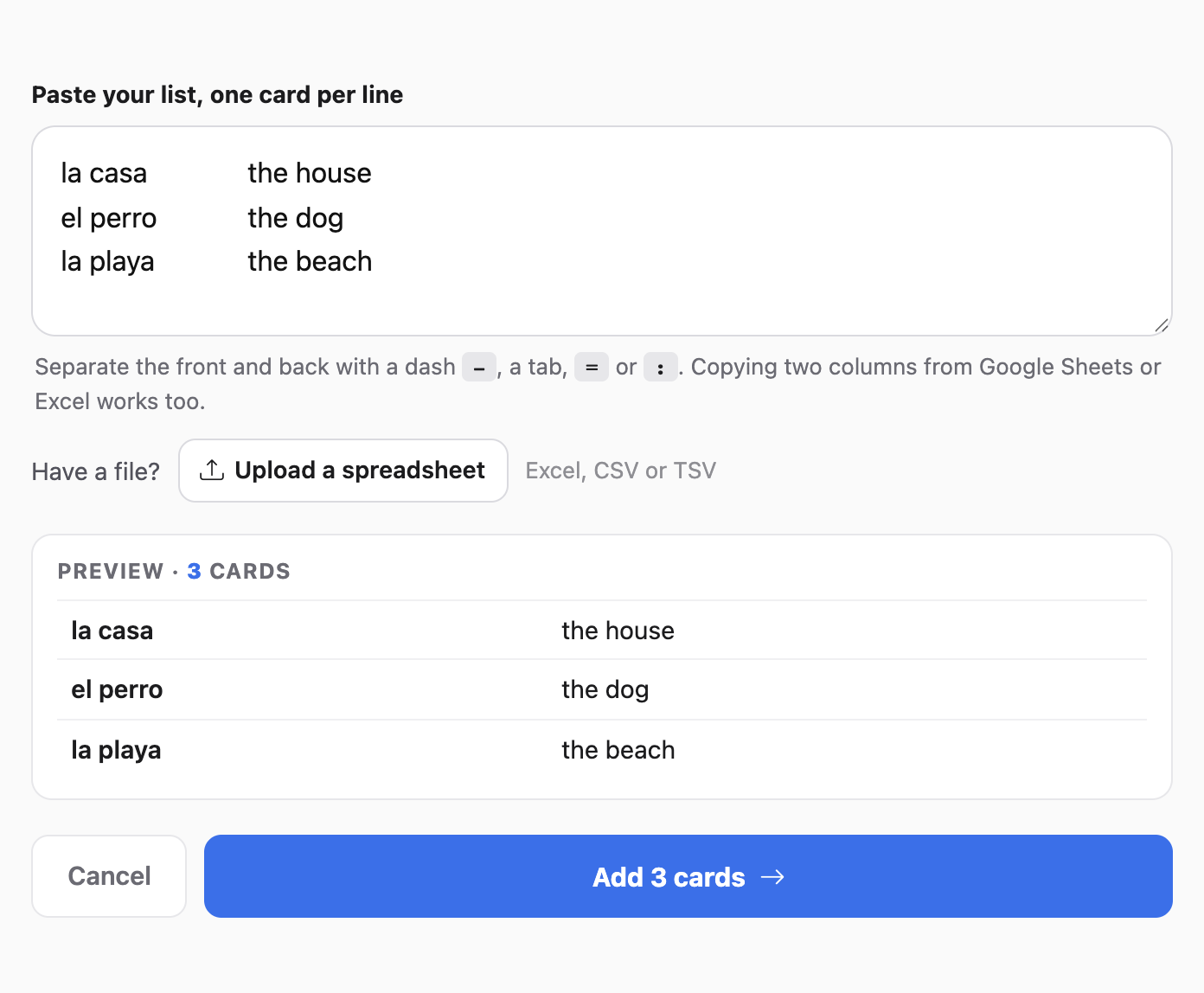
- In Quick Recall, click New Deck, give it a name, choose Many at once, and paste. You'll see a preview of the cards before you add them.
Quizlet only lets you export sets in your own library. Images don't come across, only text. If a definition has line breaks in it, the preview lists the lines it skipped; join those lines up and paste again.
Why spaced repetition matters more than the app
Whichever app you pick, what makes cards stick is spaced repetition: reviewing each card just before you'd forget it, so hard cards come back sooner and easy ones less often. Anki and Quick Recall schedule every review this way, and Knowt offers a spaced repetition mode too. If your current app has you flipping through the whole set each time, that, more than the price, is the best reason to switch.
Common questions
Is Quizlet still free?
Is there a free alternative to Quizlet?
Can I move my Quizlet sets?
Can a teacher share a deck with a class?
Want to see if Quick Recall suits you? Try any free deck in your browser, no account needed.
Quizlet, Knowt and Anki are trademarks of their respective owners. Quick Recall is an independent app and isn't affiliated with or endorsed by any of them. Details about other apps come from their official websites and may change; check there for the latest.